Order Fulfillment: A Simple Guide for Online Businesses
Build a simple order fulfillment process for your online business, from stock checks and packing to shipping updates and returns.

Order fulfillment is the process of getting an online order from checkout to the customer, including packing, shipping, and handling returns. A clear order fulfillment system helps a small online business send the right items on time, keep stock records accurate, and give customers useful updates.
Key takeaways:
- Write down every step, from receiving an order to resolving a return.
- Start with a simple process you can manage consistently; add tools as order volume grows.
- Set clear cut-off times, delivery expectations, and return instructions.
- Check order accuracy, dispatch times, stock levels, and customer questions regularly.
What order fulfillment means for an online business
Order fulfillment covers the work that happens after a customer places an order. It can include confirming payment, checking stock, picking the item, packing it, arranging delivery, sharing tracking details, and handling returns or exchanges.
For a small seller, this may mean storing products at home, packing orders yourself, and handing parcels to a carrier. A larger store may use a fulfillment partner that stores and ships products. Either way, customers expect the order to match the listing and arrive within the stated timeframe.
Fulfillment is not only a delivery task. It connects your website, inventory, customer support, and shipping process. If one part is unclear, you may sell an item that is out of stock or leave a buyer wondering whether an order has shipped.
A well-organized online store can make this process easier. If you are planning a store or improving an existing one, explore e-commerce development as one way to connect product, order, and customer journeys.
Map your order fulfillment steps
Begin by writing down what happens from the moment an order arrives. A simple written process helps you spot delays and makes the work easier to hand off when someone else helps.
- Receive the order. Check the order details and payment status in your store or sales channel.
- Confirm stock. Make sure each item is available and set aside the correct quantity.
- Pick and check. Match the item, size, color, and quantity against the order.
- Pack it safely. Choose packaging that protects the product during transport.
- Arrange shipping. Prepare the parcel for your chosen carrier and record its tracking details.
- Update the customer. Send a clear confirmation when the order is dispatched.
- Handle delivery questions and returns. Give customers a known way to ask for help.
Keep the steps in the order you actually use. If you sell made-to-order products, add production time before packing. If you sell perishable items, include suitable storage and handling checks.
Use a repeatable packing check
A short checklist can prevent common mistakes. For example: confirm the buyer’s name, match each item to the order, check that the product is clean and undamaged, include any required accessories, and verify the shipping label before sealing the parcel.
Use a simple spreadsheet or store dashboard to record orders that need attention. Avoid relying on memory, especially when several orders are being prepared at once.
Choose a fulfillment method that fits your stage
There is no single best fulfillment method for every online business. Consider your order volume, product type, storage space, available time, and the amount of control you want over packing and delivery.
Pack and ship orders yourself
Self-fulfillment can suit a new or small store with manageable order volume. You control stock, packaging, and the final check before dispatch. It can also help you learn where your process gets stuck.
Plan for the time and space it takes. Keep products organized, separate ready-to-ship orders from unprocessed stock, and set a regular packing schedule. Make sure packaging and shipping costs are included when you set prices or delivery charges.
Ask a supplier to ship orders
With dropshipping, a supplier sends products directly to your customer. This may reduce the need to store inventory yourself, but it also means you have less direct control over stock accuracy, packaging, and dispatch speed.
Before relying on a supplier, confirm how stock updates work, how quickly orders are processed, what happens when an item is unavailable, and who handles damaged parcels or returns. Explain delivery expectations clearly on your store.
Use a third-party fulfillment provider
A fulfillment provider stores inventory and handles some or all of the picking, packing, and shipping work. This can help when order volume or storage needs exceed what you can manage yourself. Compare the full service, not just the headline rate: ask about storage, packing, shipping, returns, software connections, and cut-off times.
Switching methods is a business decision, not a milestone you need to rush. First document your current process and identify the task that takes the most time or causes the most errors.
Set clear shipping and delivery expectations
Customers need to know when an order will be prepared, when it will ship, and what delivery estimate applies. Show this information before checkout wherever possible. Do not promise a delivery date unless your process and carrier can reasonably support it.
Write down your order cut-off time and working days. If orders placed after a certain time are processed the next business day, state that plainly. If a product needs extra preparation, show its lead time on the product page.
Make shipping charges easy to understand. Explain whether the charge changes by destination, parcel size, or delivery option. For a Philippine store serving customers in different areas, avoid implying that delivery timing is identical everywhere. Use the carrier’s current service information when providing estimates.
After dispatch, share the tracking link if one is available. If a parcel is delayed, tell the customer what you know and what you are doing next. A brief, accurate update is more helpful than silence or an unsupported promise.
Track inventory and order problems
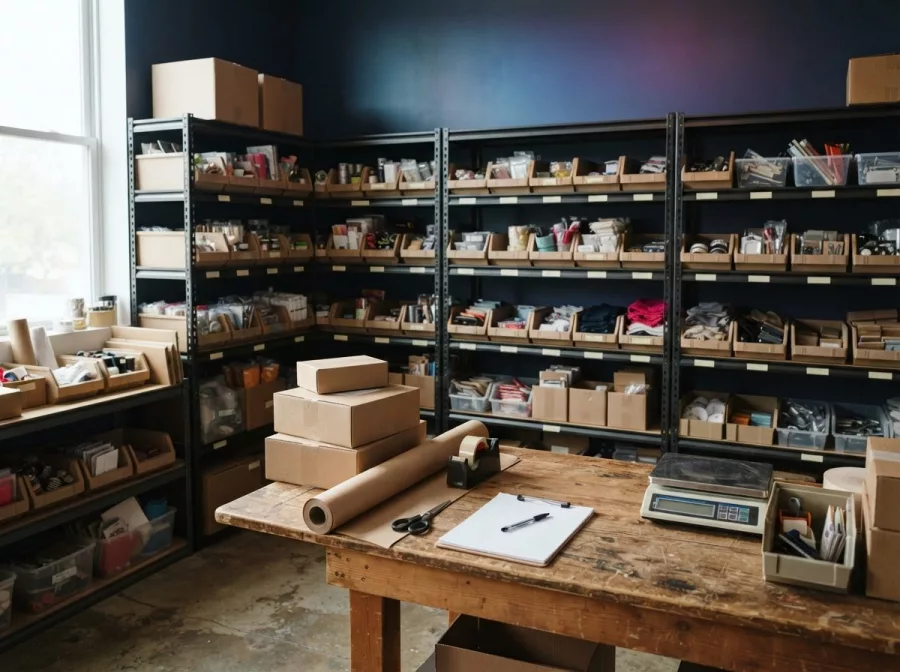
Accurate stock records reduce overselling and last-minute cancellations. Pick a system that fits your current operation: a store inventory feature, a spreadsheet, or another reliable record. The important part is updating it whenever stock arrives, sells, is damaged, or is returned to sale.
Give products clear names or codes, especially when items have variations such as size or color. Store them in labelled locations so the person picking an order can find the right item without guesswork.
Keep a short list of issues that happen more than once. Examples include stock mismatches, missing accessories, unclear product options, or repeated delivery questions. Fixing the cause may work better than adding more manual checks.
Review a few practical measures on a regular schedule:
- Order accuracy: Are customers receiving the right items and quantities?
- Dispatch time: How long does it take to prepare and hand over an order?
- Stock mismatches: How often does a listed item turn out to be unavailable?
- Support questions: Which questions keep appearing before or after delivery?
- Returns and damage: What reasons are customers giving, and can the cause be prevented?
Use these checks to find patterns, not to chase an arbitrary target. A small improvement, such as clearer product options or a better packing routine, may remove repeated work.
Make returns and customer support part of the process
Decide how customers can request a return, exchange, or refund before your first order ships. Write a policy that explains the steps, relevant time limits, product condition requirements, and how to contact you. Check that your policy follows applicable consumer rules, and avoid terms that promise more or less than your business can honor.
Make the instructions easy to find from product pages, checkout, and order emails. Explain what information the customer should provide, such as an order number and a brief description of the issue. If a return needs approval first, say so.
When a customer reports a problem, acknowledge it and give a realistic next step. Ask for only the information needed to investigate. Keep a record of the issue and its resolution so you can spot repeat problems with a product, packing method, or carrier.
Clear post-purchase messages can also reduce support requests. Send an order confirmation, a dispatch update, and a practical contact route. For more ways to encourage another purchase after the first one, see the guide to abandoned cart emails and consider how your store can follow up without sending irrelevant messages.
Tools and improvements for a growing store
Start with tools that solve a real problem. A store platform can keep orders in one place, while inventory records help prevent overselling. Shipping tools may reduce manual label work, and customer support tools can keep order questions from being lost in personal messages.
Before adding an app or service, ask what information it needs, how it connects to your store, what work it removes, and what happens if the connection fails. Keep access limited to people who need it, and protect customer information. If your process relies on several channels, decide which one is the reliable record for each order.
As your store grows, review whether the website gives customers and staff the information they need. Product availability, shipping terms, order updates, and return instructions should be easy to find. For support with the store itself, see website design and development or website maintenance and technical support.
For a small team, keep the first improvement narrow. You might organize stock locations, add a packing checklist, or make delivery estimates clearer. Test one change, observe whether it reduces errors or questions, and then decide what to improve next.
Frequently asked questions
What is order fulfillment in an online business?
Order fulfillment is the process of preparing and delivering an order after checkout. It includes stock checks, picking, packing, shipping, customer updates, and often returns.
How can a small online store fulfill orders?
A small store can manage stock and shipping itself, ask a supplier to ship products, or use a fulfillment provider. Choose based on your products, time, storage, and order volume.
What should an order fulfillment checklist include?
Include payment and stock checks, item and quantity verification, safe packing, a correct shipping label, dispatch updates, and steps for handling delivery issues or returns.
When should a store use a fulfillment provider?
Consider one when packing, storage, or shipping regularly limits your ability to run the business. Compare the complete service and costs before changing your process.
How do I reduce mistakes when shipping orders?
Keep inventory records current, use clear product labels, check each item against the order, and verify the address and label before dispatch. Review recurring mistakes and fix their causes.
A dependable order fulfillment process does not need to be complicated. Write down your steps, set honest delivery expectations, and improve one recurring problem at a time. If you need help planning an online store or improving its order experience, contact Herby Design.
Found this helpful? Share it
Selling online? Make order fulfillment simpler with a clear process for stock checks, packing, shipping updates, and returns. 📦#OrderFulfillment #ECommerce #OnlineBusiness #BusinessTips
Caption and hashtags copied: paste them into your post.
Need help with your website?
I build fast, SEO-ready websites and web applications.