Website Marketing Funnel for Philippine Small Businesses
Turn website visits into enquiries with a practical funnel for Philippine small businesses: build the right landing page, simplify contact, and track results.

For Philippine small businesses, a useful website marketing funnel gives visitors one clear next step: ask for a quote, book a service, or place an order. Build a dedicated page for that action, make it easy to use on a phone, and track completed enquiries so you can improve what works.
Key takeaways
- Match each marketing link to a page that answers the visitor’s specific need.
- Put one main call to action near the top, with clear contact options.
- Keep forms short and explain what happens after someone submits one.
- Measure completed enquiries, not just page views or clicks.
- Test the customer journey on a phone and review it regularly.
What a website marketing funnel means for a small business
A funnel is the set of steps a potential customer takes before contacting or buying from you. For example, someone may find a Cebu repair service through search, visit its service page, check its location and hours, then request a quote.
Website marketing works best when those steps feel connected. A visitor who clicks an ad for a specific service should not land on a general page that makes them search again. The page should confirm the service, answer common questions, and offer a relevant next action.
This is a focused way to build on a broader website marketing plan for Philippine small businesses. Instead of adding more channels immediately, make the path from a visit to an enquiry clear and measurable.
Map the customer journey before changing your website
Start by choosing one priority offer. It could be a service, a product category, an appointment, or a consultation. A single priority makes it easier to write a specific page and judge whether the page helps.
Write down the visitor’s steps
Describe the journey in plain language: “A customer searches for air-conditioner cleaning, reads our service details, checks our coverage area, and requests a booking.” That statement reveals the questions your page needs to answer.
Consider what a local customer may need to know before acting. State the service area, available contact methods, business hours, and what information is needed for a quote. Avoid promising response times or service coverage unless you can reliably meet them.
Give each traffic source a suitable destination
Use a page that matches the source and message. A social post about a particular product should link to that product or category, not the homepage. A local search listing should send people to a relevant page where they can understand the offer and take the next step.
For businesses with several locations, make location details easy to find and keep each location’s information accurate. If you use Google Business Profile action links, Google says those links should lead to a dedicated landing page for the business and let customers complete the action named by the link. See Google’s business links guidelines.
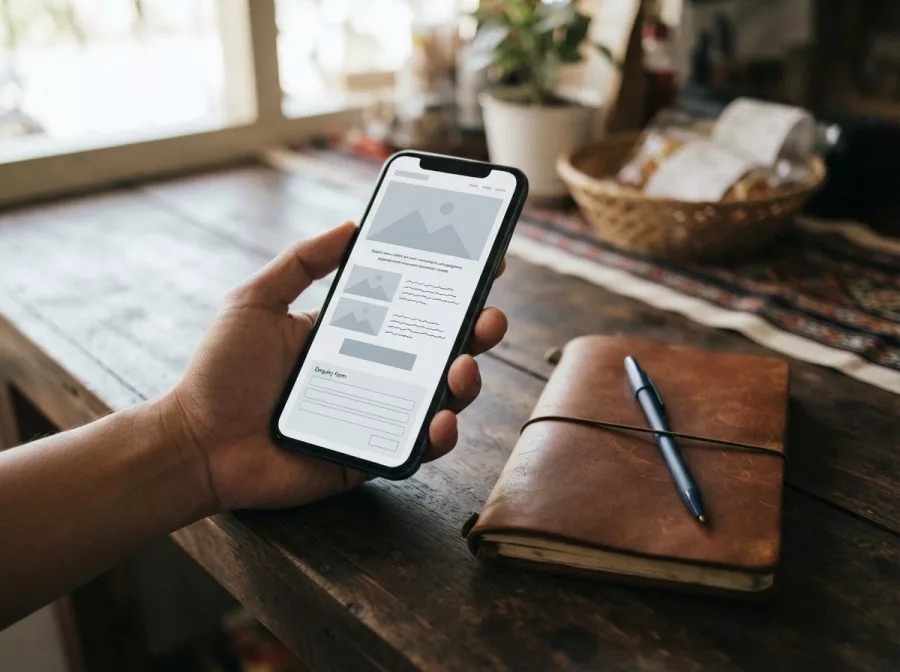
Build a landing page that makes the next step obvious
A landing page is a page designed around one offer or action. It does not need elaborate effects. It needs clear information, a visible next step, and enough reassurance for a visitor to act.
Use a clear opening section
At the top of the page, say what you offer, who it helps, and where you provide it. Use a heading that names the service or product, followed by a short explanation. Add one primary button, such as “Request a quote” or “Book a consultation.”
Make the button label describe what happens next. “Submit” is less helpful than “Ask for a repair quote.” If you offer phone or messaging contact, show those options without letting them compete with the main action.
Answer questions that block a decision
Include practical details that customers need before contacting you. Depending on your business, these might include service areas, product specifications, delivery information, payment methods, appointment steps, or return terms. Keep each answer close to the relevant offer.
Use real photos of your products, premises, or work where appropriate and permitted. Avoid stock imagery that suggests a service or location you do not actually provide. For more on creating a usable site, see this small business website guide.
Make enquiries simple and trustworthy on mobile
Many customers browse on a phone, so check the page on a small screen before promoting it. Text should be readable without zooming, buttons should be easy to tap, and the main contact option should not be hidden below long blocks of content.
Ask only for information you need
A quote form might ask for a name, a contact method, and a brief description of the request. Add other fields only when they help you respond. A long form can make a simple enquiry feel like work.
Tell people what happens after they send the form. For example, explain that you will use their details to respond to their request. Use a confirmation message that acknowledges a successful submission and provides an alternative contact method if the request is urgent.
Check the full contact path
Test every button, form, phone link, and messaging link. Submit a test enquiry and confirm it reaches the right inbox or system. Check that error messages explain how to fix missing or invalid information.
Keep contact details consistent across your website and business listings. For a local business, accurate location and contact information helps visitors feel confident they have reached the right provider. You can also review your Google Business Profile marketing as part of the same customer journey.
Track enquiries and improve one step at a time
Page views show that someone visited. They do not show whether the page produced a useful business result. Choose a small set of measures tied to your goal, such as completed quote requests, bookings, calls, or online orders.
Measure a completed action
Use analytics to record an event when a visitor completes a meaningful action. Google Analytics explains that a lead form submission can be measured as a key event, but a specific form may need its own event. Check the setup and test it before relying on reports: Google’s guide to measuring key events.
Do not treat every button click as a completed lead. A click may open a form without a submission. Where possible, count success only after the form has been accepted or the customer reaches a confirmation state.
Review the journey and fix friction
Look at the steps between a landing page and a completed action. If visitors reach the page but rarely start the form, the offer, information, or call to action may be unclear. If they start but do not finish, check for confusing fields, technical errors, or a form that asks too much.
Change one thing at a time, then give the change enough traffic and time to review fairly. Keep notes about what changed and when. For practical ways to connect search activity with business outcomes, read SEO reporting that tracks real leads.
A practical launch checklist
- Choose one offer: Pick a service, product, or booking goal for the page.
- Match the page to the source: Link each promotion to the most relevant landing page.
- Write clear details: Explain the offer, service area, and next step.
- Make contact easy: Use a short form and visible phone or messaging options where suitable.
- Test on a phone: Check layout, speed, buttons, form errors, and confirmation.
- Verify delivery: Confirm test enquiries reach the correct person or system.
- Track completions: Set up and test measurement for the action that matters.
- Review and refine: Use customer questions and observed friction to guide the next change.
If your current site needs a clearer page or stronger customer journey, explore website design and development and search engine optimization services.
Frequently asked questions
What should a small business website call to action say?
Use a short phrase that names the next step, such as “Request a quote” or “Book an appointment.” Make sure the action matches what the page offers.
Should I send all marketing traffic to my homepage?
No. Send visitors to the page that best matches the specific product, service, or message they clicked. This saves them time and makes the next step clearer.
How do I know if my website marketing is working?
Track completed business actions, such as enquiries, bookings, or orders. Compare those actions with the traffic source and landing page, and check that tracking works.
What should I check first if visitors do not contact me?
Test the page on a phone, review whether the offer and contact button are clear, and submit the form yourself. Check that the form works and enquiries arrive where expected.
Do I need a separate landing page for every campaign?
Not always. Create a dedicated page when a campaign has a distinct offer or audience that needs different information. Otherwise, a relevant existing service or product page may be enough.
Turn more website visits into useful enquiries
A strong website marketing funnel is a clear customer journey, not a complicated system. Match each promotion to a useful page, remove obstacles to contact, and measure completed actions before deciding what to improve next.
Need help improving your website journey? Contact Herby Design to discuss your business goals.
Found this helpful? Share it
Want more website enquiries? Build a simple funnel that turns visits into leads for your Philippine small business. 🙂#SmallBusiness #Philippines #WebsiteMarketing #LeadGeneration #DigitalMarketing
Caption and hashtags copied: paste them into your post.
Need help with your website?
I build fast, SEO-ready websites and web applications.